
Dice Recognition — Phase 1
Building a dice recognition system using computer vision and synthetic training data. Phase 1 covers the initial approach, dataset generation and first model results.
D20 dice models sourced from this set on CGTrader.
Optimised from 25MB to 149KB for WebGL scene above.
Overview
This is the first in a series of articles documenting the development of a dice recognition system capable of identifying the face value of a standard six-sided die from a camera feed in real time. Moving onto more complicated dice in the future, like the infamous D20 above.
Disney and NVIDIA's work on the BDX droids and the Olaf robot opened my mind — both use simulated environments to train robot locomotion at scale, running hundreds of thousands of virtual robots in parallel before a physical one ever takes a step.
Could I use a simulated environment to generate synthetic images which were close to their real world counterpart, and if so drastically change how much training data could be generated without requiring so many real world samples.
The Problem With Real Training Data
Collecting and labelling real images of dice is tedious. You need enough variation in lighting, angle, distance and die colour to generalise well, and every image needs to be manually labelled with the correct face value.
For a D6 alone that means six classes, each needing hundreds of representative images across different dice colours, surface types and lighting conditions. Scale that to a full set of TTRPG dice and the data collection problem becomes the whole project.
There had to be a better way.
Concept & Research
The first step was finding a compelling problem to try and solve, as my family and I recently started out with Dungeons & Dragons (due to a very popular TV show) I realised that detection of die faces is a great one to try and solve using ML.
So the idea was set.
I would try and use Unity 3D and my experience to train an ML model to detect dice faces using synthetic data generated from a game engine.
I purchased a fantastic set of low-poly TTRPG which I used in the interactive WebGL scene above and also as a basis for the synthetic data generation.
Verified that the licence allowed it to be used in AI model training (it did!)
and decided the D6 was a good place to start.
Synthetic Data Generation
The approach uses a 3D rendering pipeline to generate dice images with controlled variation across:
- Lighting — random HDRI environments, directional lights at varied angles
- Camera angle — randomised pitch, yaw and distance within realistic ranges
- Die colour — varied diffuse materials from white to black with coloured pips
- Background — random textures and solid colours
Each render is automatically labelled with the face value visible to the camera.
Pipeline architecture
The full pipeline consists of three distinct stages:
- Unity3D (Data factory) - Synthetic image generation with automatic YOLO format annotations
- Python / YOLOv8 (Training) - Model training using ultralytics on the generated dataset
- Python (Inference) - Real time webcam feed inference for real world validation
3D Asset Preparation (Blender)
The models from CG Trader already came with a .blend file with a nice clean setup in the project and 3 textures to work with.
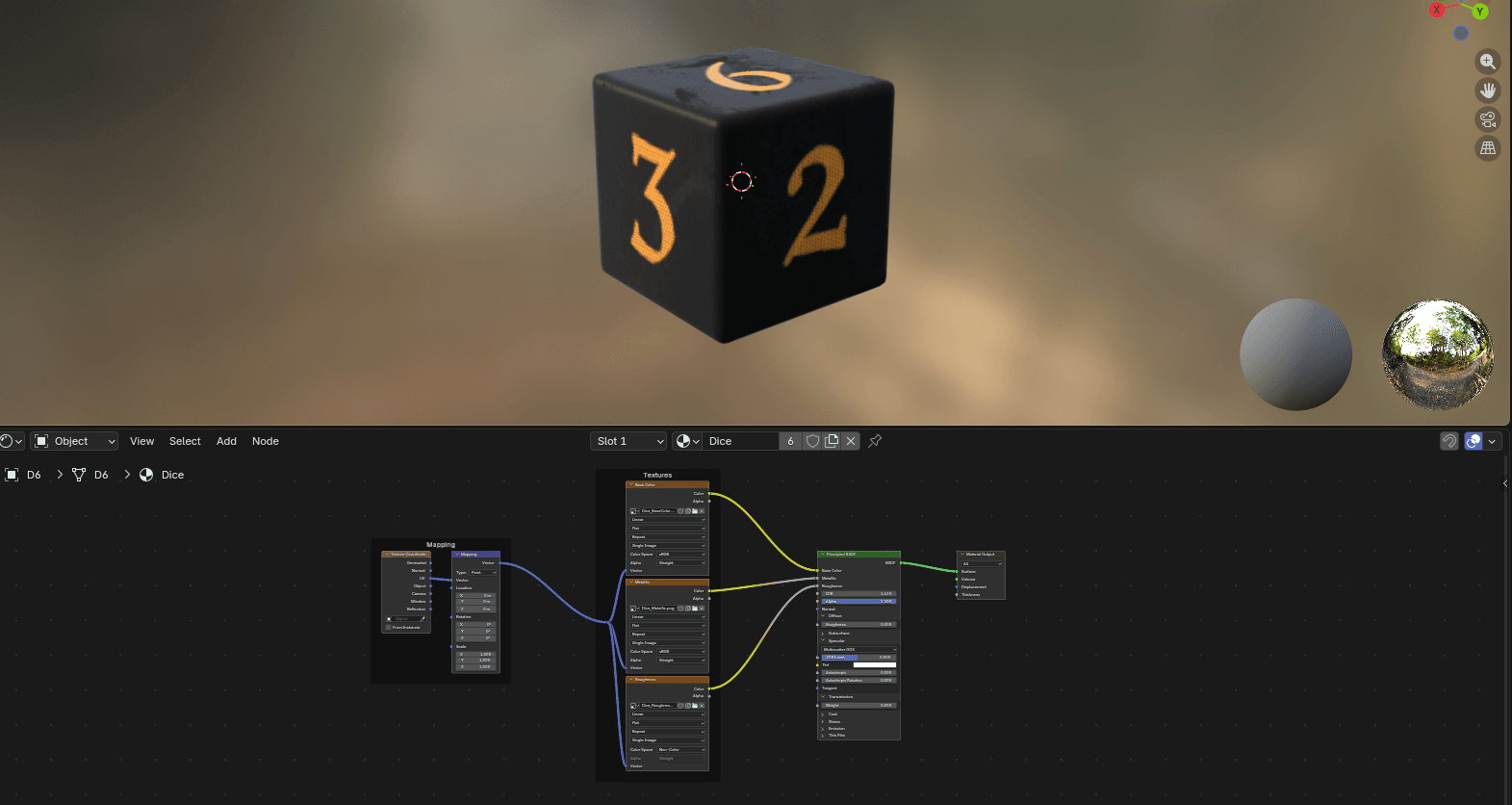
I exported the model as an FBX as that's a nice way to get the model and materials into Unity from Blender, ensuring the correct scale and transform data was setup during the export.
Unity scene setup
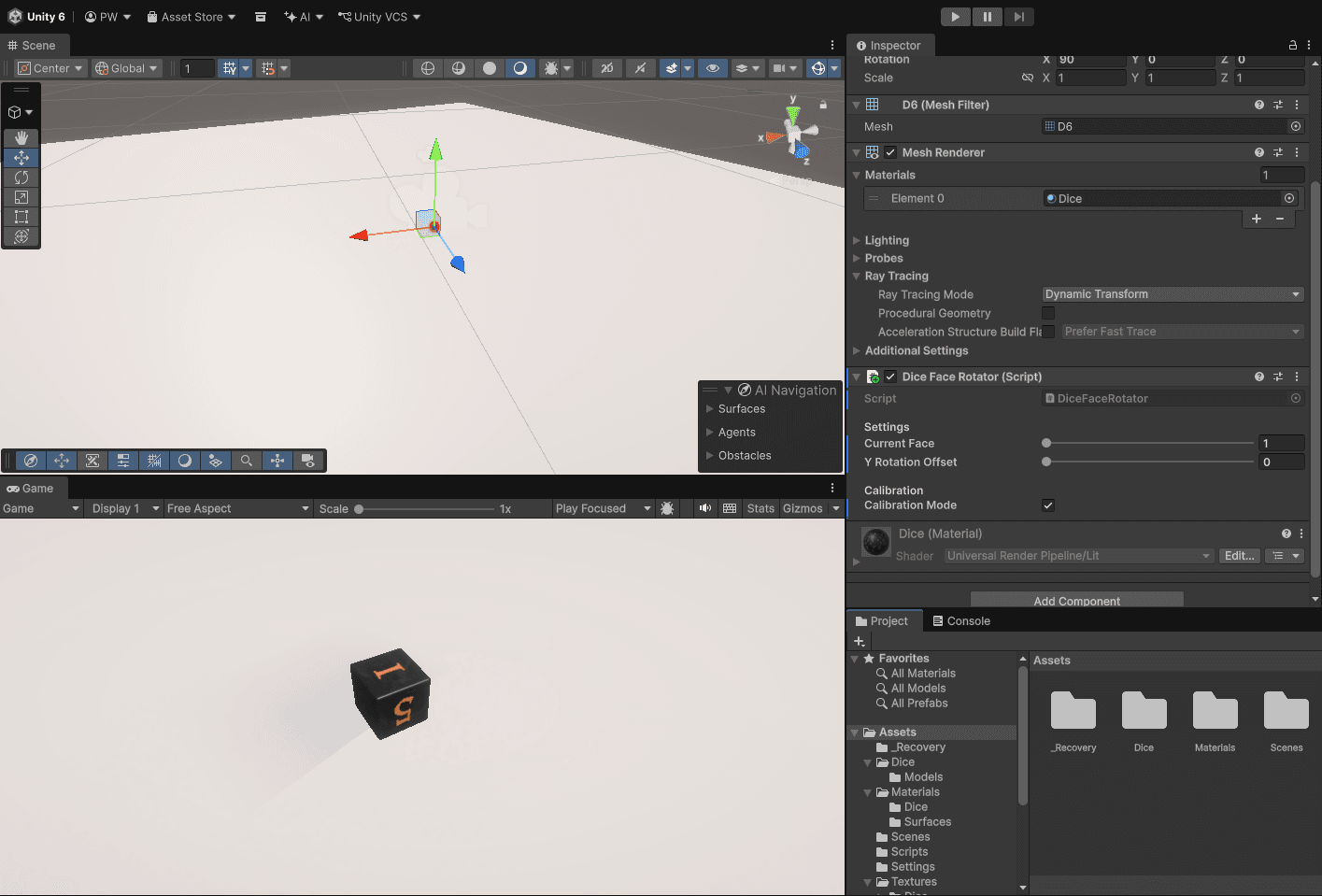
The next step was setting up the Unity scene.
- Created a new Unity URP project
- Imported the D6 FBX and texture maps into the project
- Set the correct colour space on the each texture, -sRGB for BaseColor, linear for metallic and roughness.
- Created URP Lit material with correct texture assignments
- Added plane as a table surface, two lights (directional and fill), camera at a realistic viewing angle for table top gaming.
- Adapted the camera near and far clipping to prevent die from disappearing at close range.
Face calibration
During the research phase I had looked to use a package called Unity Perception for the label generation, unfortunately it required HDRP (a high performance rendering pipeline) and that has now been retired in favour of URP or the "default" rendering pipeline of the future.
So with that first problem in the way, I decided it would need to be a custom data factory pipeline instead, which actually gave more flexibility and understanding of each component so win, win.
First step was to work on the face calibration, the core idea being that the scripts I would write would essentially randomise the die to show the top face and the associated bounding box and label would be applied to that rotation.
This was a manual process in Unity in which I had to manually map the faces of the die using the specific transform data of each face. I decided to make some editor level controls to make this easier to review as seen in the video above.
With that done, I could move onto the scripts which would control the randomisation of the die within the scene.
Data factory scripts
It ended up being 4 scripts in total, a brief description of each is below:
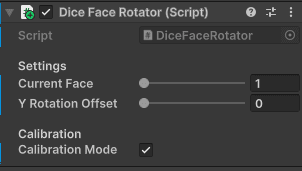
DiceFaceRotator
Rotates the die to precise calibrated face orientations. Includes a calibration mode for the visual verification
using the Unity editor to rotate between the six die faces.
SceneRandomiser
Randomises the following per capture to maximise variety
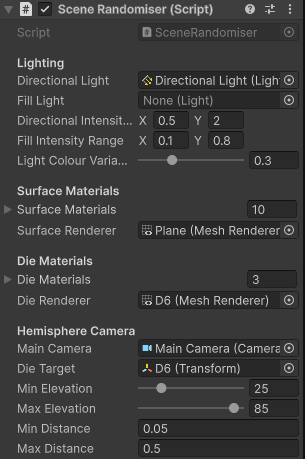
- Lighting - intensity, colour and angle of the light were all key to making the capture variety needed to train the model correctly.
- Surface material - This was important for real world inference due to the different surface types which could occur out in the wild, wood velvet and plain surface variants were included.
- Die material - from the colour variants provided in the downloaded pack from CG Trader.
- Camera position - creating a realistic line of sight from a position of someone looking down at a TTRPG table was equally as important for training for real world scenarios. Elevation 30-85 degrees, full 360 around the target model and from varying distances to improve inference recognition once the model was trained.
AnnotationWriter
This was the unknown part to me, and the core of what the Unity package (which ended up being a bust!!) would have made
easier, but as I mentioned before it actually gave me much more control and understanding of what was needed.
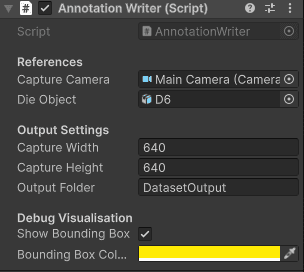
It captures each frame, once randomisation has occurred, and writes the matching YOLO format annotation:
- 640x640px PNG Image
- Matching .txt annotation file with bounding box in YOLO normalised format
- Bounding box calculated by projecting die mesh bounds to screen space via RenderTexture.
- Outputs to timestamped folders per run (I like file system organised, made it easier to pick when training the model)
- Debug bounding box overlay in the Game view for visual inspection while generating.
DataFactory
This was the orchestrator class that coordinates all of the pieces.
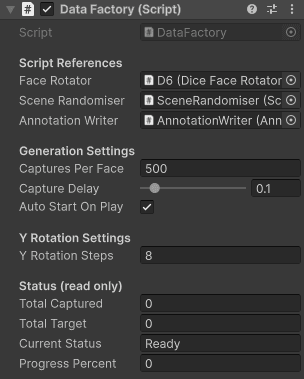
- Iterates through all six face values
- Sets face rotation, randomises scene, waits one frame, captures and writes annotation
- Put some editor config in there to control per face and capture delay
- Progress tracking was visible in the Unity editor.
Surface and Die material variety.
As mentioned before this was crucial to the training data. I found some great free textures on Polyhaven for the variation of wood grain and colour, used Affinity Designer to create some colour variation in the texture files so I had some light and dark wood materials, then also got some velvet textures in a variant of colours.
Die materials were just the ones which came with the CG Trader set but could be expanded further in future to account for different dice sets.
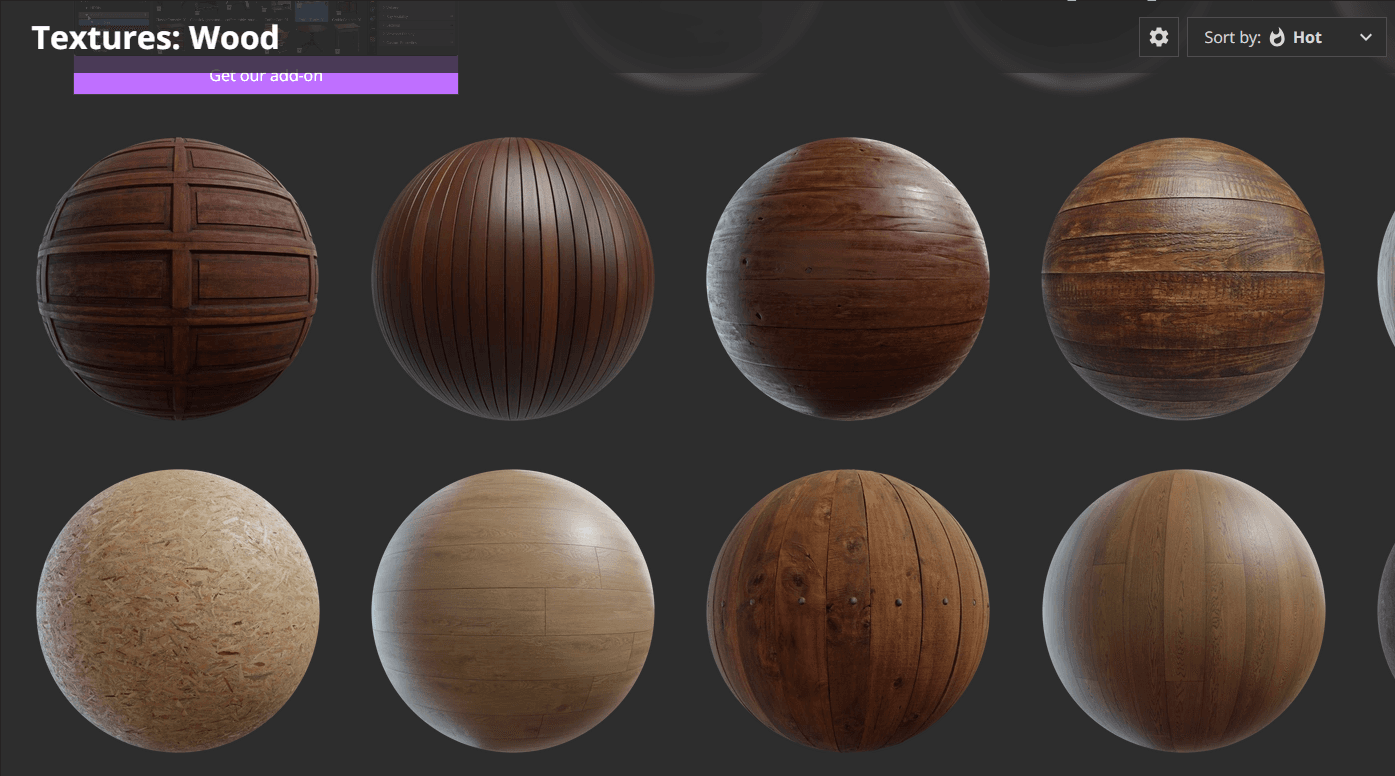
The more variation I could provide in the synthetic images the better the model would perform when real world inference occurred, in simple terms it "should" mean that the detection works better in the real world and with different dice sets.
First dataset generation
Now it was time to put all this work to the test... image generation using entirely synthetic setup inside Unity game engine.
- Generated 3000 images, 500 per face across all six face values
- Verified annotation files showing correct bounding box coordinates (~0.5 centerX confirming centred die)
- Confirmed debug bounding box visible and accurate in Game view during capture
- Generation time approximately 6-7 minutes, could be quicker but I put a delay in to "see" it working
- Created data.yaml with the correct class definitions:
(0: d6_1 through 5: d6_6)
Below is what the generation process looked like:
Python environment setup
- Installed Miniconda and anaconda prompt to assist with windows PATH issues
- Created dice-detector conda environment with Python 3.10 to keep packages isolated and clean
- Install ultralytics (YOLOv8 / YOLO11 framework)
- Resolved CUDA detection - installed PyTorch with CUDA 11.8 support for GTX1060 for training
- Confirmed GPU available for training
- Set up VS Code with Jupyter notebook extension to make development and training easier
- Connected dice-detector conda environment as notebook kernel
- Created train.ipynb notebook in ML subfolder for organised project structure
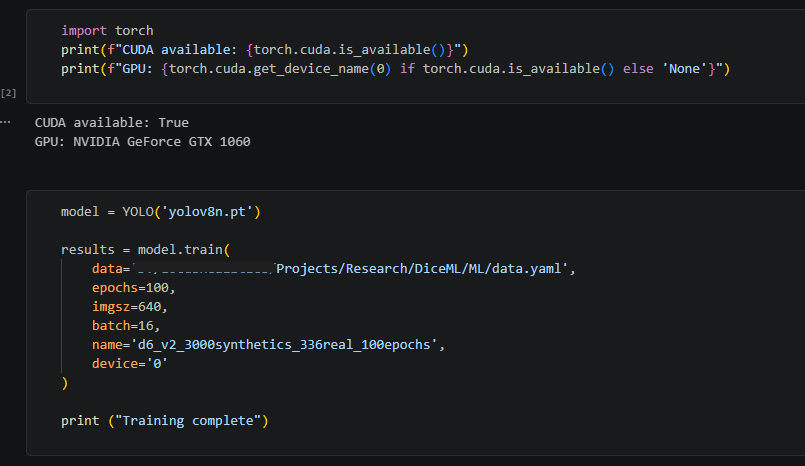
First Training Run (v1)
Time to put the dataset to work. The first run used YOLOv8 nano — the smallest and fastest variant in the YOLOv8 family, pretrained on the COCO dataset via transfer learning. The idea being to establish a baseline before reaching for anything heavier.
Configuration
- Model: YOLOv8n (yolov8n.pt) — pretrained COCO weights, transfer learning
- Dataset: 3,000 synthetic images
- Epochs: 50 | Batch size: 16 | Device: GTX 1060
Training took approximately 3.2 hours on the GTX 1060.
v1 Results
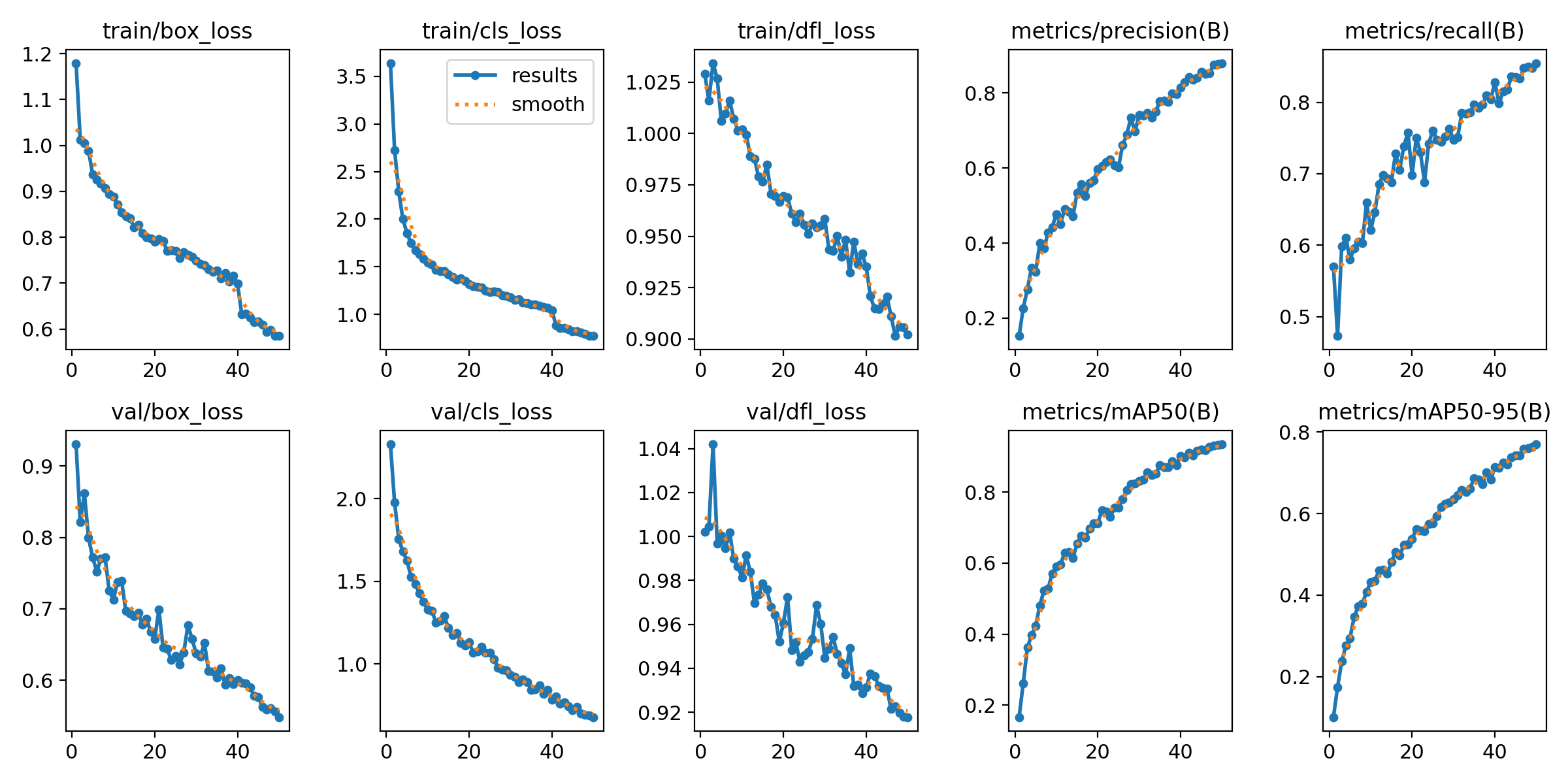
The numbers came back better than expected for a first run on entirely synthetic data:
- mAP50: ~0.90 — 90% mean average precision at IoU threshold 0.5
- mAP50-95: ~0.75 — solid across stricter IoU thresholds
- Precision / Recall: ~0.85 across both
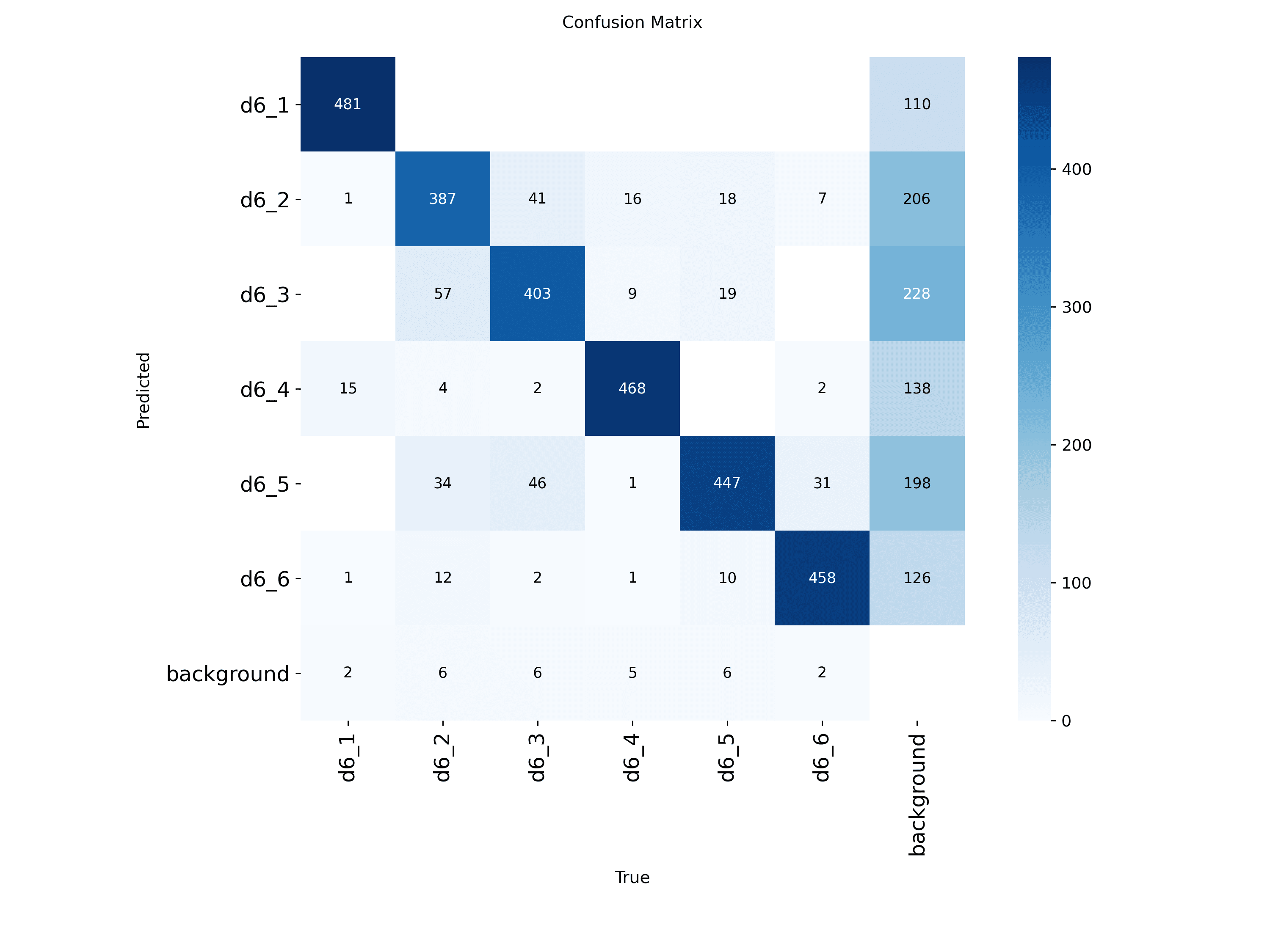
90% mAP50 on a first pass with zero real-world training images felt like a genuine validation of the synthetic data approach.
What the curves told me
With some help from Claude...
The results.png showed something important though — all loss curves were still trending downward at epoch 50. The model hadn't converged. It wasn't done learning, I'd just stopped it too early.
More epochs and more data would push this further, and that became the basis for the v2 approach.
But impatient to see some results, I decided to see how this model would do with some real world inference.
Testing inference
Based on the fact that the model still had more epochs it could train for and that the data was entirely synthetic I wasn't expecting much and you will see from the video below it's a very scrappy example but here are some key points to consider:
- The dice which is being used in the video is nothing like the dice the model was trained on meaning the fact that detection is occurring for even some of the faces means that the synthetic data approach is validated.
- The confusion matrix did show that there were issues with certain classes there was still quite a bit of confusion around certain numbers. D6_2 and D6_3 were some of the highest offenders and that shows in the video below along with D6_5 and D6_6.
- The high background miss rate for these classes also meant the model frequently failed to detect the die at all when those faces were showing.
Next Steps
So, ever the optimist, I want to lean into point 1 as much as possible here.
The goal was to take fully synthetic images generated in a game engine and train a model to detect the faces of a die and I think that was achieved (partially). It is far from perfect but in my opinion showed enough promise to continue and try to improve that inference further.
So here is the plan for Phase 2
- Close the sim-to-real gap, something which can occur when training using purely synthetic data
- Improve the inference tool, right now it was too jumpy per frame
- Give the model the time to train properly
If you made it this far, then thank you for putting the time in to read the article.
TL;DR
- Used Unity 3D to generate 3,000 synthetic dice images instead of collecting real ones
- Trained YOLOv8 nano on entirely synthetic data, achieved 90% mAP50 on first run
- Real world inference was scrappy but proved the synthetic data approach works
- Phase 2 will close the sim-to-real gap and train for longer